Automatic Replies to Reviews in App Stores
With the Angry.Space service, you can automate handling reviews from popular app stores:
- Google Play
- App Store
The tool works based on auto-rules: You set conditions, and if a new review matches them, the system automatically performs the specified actions (e.g., posts a reply, assigns tags).
Selecting Apps
Before setting conditions, you need to choose which apps the auto-rule will apply to.
Important Rule:A single auto-rule can only be created for one specific source (app store).
- You can select multiple apps within the same store at once (e.g., create a single rule for three different apps in Google Play).
- You cannotcreate one common rule for both Google Play and App Store simultaneously. This technical limitation is due to different platforms having different limits on the maximum reply text length.
What Conditions Can You Set?
For precise auto-rule configuration, you can combine the following parameters:
- Rating: Number of stars (from 1 to 5) — you can select multiple;this is mandatory for auto-replies.
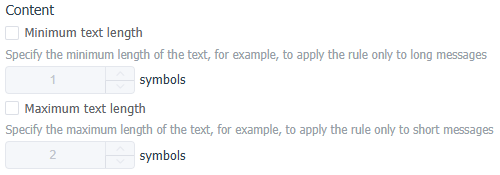
- Text Length: Number of characters in the review (useful for separating short comments from detailed feedback).
- Text Content (words and phrases): The presence of specific words/phrases in the review text.
- Exceptions: A "do not apply rule if text contains anywhere" condition. This is a crucial tool to prevent the auto-reply system from triggering on sensitive topics (e.g., if the text contains words like "refund," "court," "scammers").
- Validity Period: For example, if a bug appears, you can create an auto-rule for a couple of days (the fix timeframe) to respond to error reports, informing users that developers are aware of the issue and an update will be released soon.
Available Actions
If the rule conditions are met, the system can perform the following actions:
- Change Status to Closed: To prevent certain reviews from reaching operators at all.
- Add Tags: Helps segment reviews (e.g., "Bug," "Praise," "Delivery") for further analysis.
- Reply: Sending text on behalf of the company.
You can set multiple reply options within a single rule, and the system will randomly select one for variety.
Logic for Multiple Rules Triggering
If one review matches the conditions of several auto-rules, the system processes them differently depending on the action type:
- Tags — are summed. If a review matches three different rules, and each has its own tags, all these tags will be added to the review.
- Reply — is sent only from the first rule. The reply text will be sent only from the first rule in the list whose conditions are met. The "Reply" action will not trigger for any rules below it (however, their tags will still be assigned).
Tip: You can change rule priority by simply dragging them up or down in the general list.
We recommend placing rules with more narrow conditions at the top of the auto-rule list.
Creating an Auto-rule for Automatic Review Replies
To create a new automation rule
- Go toSettings - Automation rules
- Click the "New Rule" button
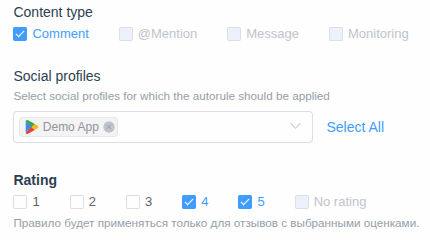
- Select the Content Type "Comment"
- Choose the Social profiles (your apps) the rule will apply to
- Select the ratings for which the auto-rule should work:
- Optionally, you can add a condition for the review text length (e.g., to create separate rules for short and long reviews):
- You can set a condition for the presence of specific keywords or phrases in the review text (e.g., to respond to reviews mentioning bugs/errors, asking users to send details via email):
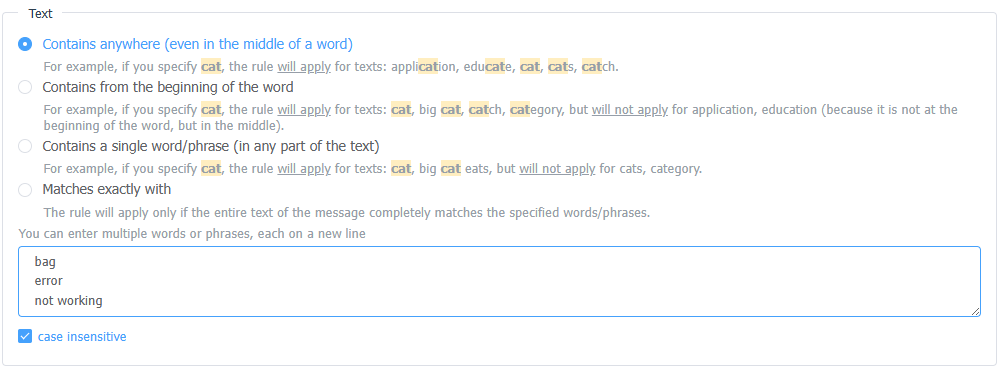
- You can set exceptions to prevent the auto-rule from applying if the review text contains certain stop words:

- Select the actions "Reply" and "Change Status to Closed", and enter several reply variations:
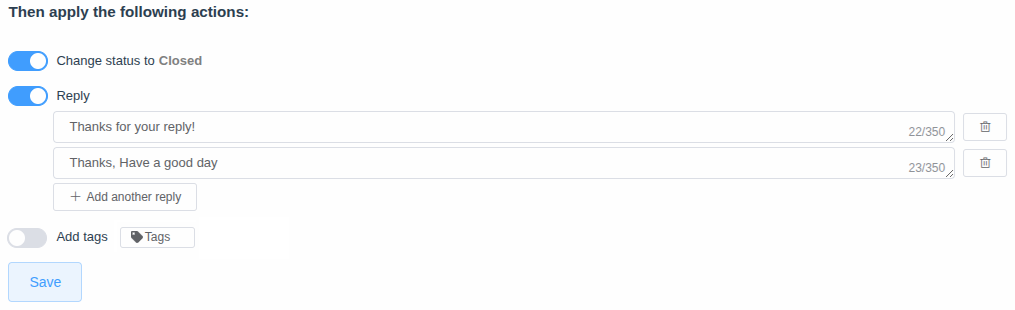
If the reply is sent successfully, the status will change to Closed.
If an error occurs while sending the reply, the review will appear in the list for manual processing.
- Click the "Save" button
Examples of Auto-rules for Automatic Replies
Below are several scenarios that you can adapt to your needs.
Pay attention to the first two examples: they show how the same rating (5 stars) can be handled differently depending on the text — the rule positioned higher in the list will trigger.
Example 1: Thanking for Support Work (5-Star Rating)
We process 5-star reviews but respond to specific words of gratitude.
- Condition: Rating equals 5.
- Condition: Text contains the words from the start: support, helped, assistance, fast response.
Actions:
- Reply: "Thank you for your kind words! We will definitely pass your gratitude on to our support team. We were happy to help!"
- Add Tag: Gratitude
- Change Status to Closed.
Example 2: Short Reviews Without Meaningful Content (5-Star Rating)
Suitable for quickly handling 5-star ratings without details.
- Condition: Rating equals 5.
- Condition: Text length < 15 characters.
- Condition (Exception): Do not apply if the text contains bug, error, not working.
Actions:
- Reply (random choice): "Thanks for the 5 stars!" / "Thank you for the high rating, we do our best for you!"
- Change Status to Closed.
Example 3: Feature Improvement Suggestions (4-Star Rating)
The user is satisfied, but something is missing.
- Condition: Rating equals 4.
- Condition: Text contains a specific word/phrase: missing, please add, I wish, make it.
Actions:
- Reply: "Hello! Thank you for your feedback and the good rating. We are constantly developing the app and will definitely pass your suggestions on to the developers for future updates!"
- Add Tag: Suggestion
- Status: Leave it open (if a manager needs to log the suggestion) or change to Closed.
Example 4: Standard Technical Issue (1-3 Star Rating)
Collecting information to localize the problem.
- Condition: Rating from 1 to 3.
- Condition: Text contains the words from the start: crash, freeze, error, bug, not working.
Actions:
- Reply: "Hello! We're sorry you encountered this issue. Please email us at support@yourdomain.com, specifying your device model and OS version. We’ll promptly check everything!"
- Add Tag: Error
- Change Status to Closed (since we redirected the user to email).