Collecting messages from a personal account
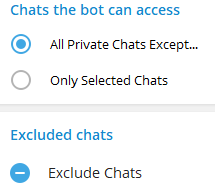
During setup, you cannot select group chats/channels that the user is a member of; the bot processes only the selected private chats.
In the selected chats, the bot will collect all messages except those sent by itself and by other bots. Such messages will not be displayed in the service.
The bot can reply on your behalf only in those chats where no more than 24 hours have passed since the last activity.
If more time has passed since the last message, you will be able to reply only in Telegram itself.
To correctly collect messages from personal account, follow these steps for the bot that you previously created and added to the service according to theinstructions.
Go to the chat with@BotFather
Enter the command /mybots in the chat or open the Web App using the "Open" button and select the bot you previously created
Go to the bot settings (theBot Settingssection)
 или

- EnableSecretary Modeby clicking the "Turn on" button if you are configuring via chat, or activate the toggle in the Web App
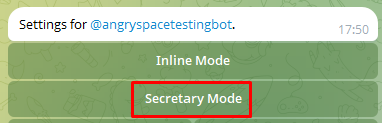 или
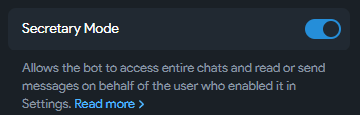
STEP 2: Connecting the bot to a Telegram profile
Go to the settings of the personal Telegram account from which you want to collect messages
Go toTelegram Business - Chatbotssection
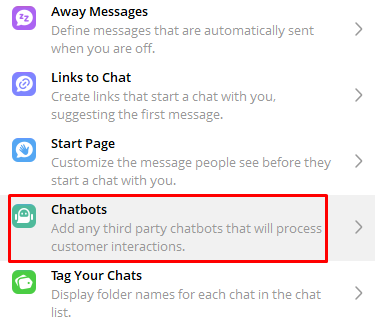
- Connect the bot you created to your account by specifying its name or a link to it
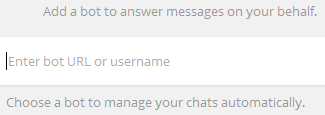
- Configure the list of chats that this bot should process
- Grant the bot permission to process private messages
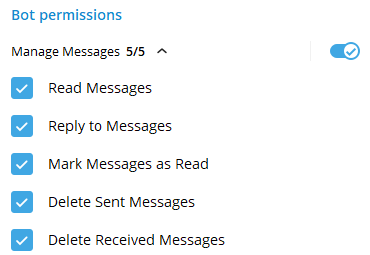
If all settings are configured correctly, messages from the selected chats will start arriving in the service, and you will be able to reply to them on your own behalf.
You will see it in the"Settings - Social profiles"section.
It cannot be edited, and it can be fully deleted only after disconnecting the link with the bot in the Telegram account settings, or after disabling "Business Mode" via@BotFather.
Important! How to avoid collecting spam from third-party groups/channels?
Please note that your bot may be added to a third-party chat or channel without your knowledge, and spam will begin to be collected in the service, which will be counted in the statistics and, accordingly, in the final cost of the service.
After adding the Telegram bot, perform the actions specified inTHIS ARTICLE.
This will help avoid spam comments getting into the service.
Also, for the bot that processes chats in a personal account, you need to enable additional protection so that the bot cannot be added to process a third-party account.
To do this, in the bot settings in theSettings - Social profiles section, activate the toggle in the corresponding block.
