Collecting messages from group chats
In Angry.Space, you can collect and process messages from members of group chats (including supergroups) in which the bot connected to the service is present.
If Topics are enabled in your group chat, each topic will be treated as a separate publication.
To correctly collect messages from group chats, follow these steps for the bot that you previously created and added to the service according to theinstructions.
STEP 1: Additional bot settings in Telegram
Go to the chat with@BotFather
Enter the command /mybots in the chat or open the Web App using the "Open" button and select the bot you previously created
Go to the bot settings (theBot Settingssection)
 или

- Check that the ability to add the bot to groups (theAllow Groups?section) is enabled (as a rule, it is enabled by default)
 или

- Go to the privacy settings (theGroup Privacysection) and disable the bot's privacy mode
This is an important condition for correctly collecting inquiries into the service.
 или

STEP 2: Add the bot to the desired group chat with Administrator rights
Go to the settings of the desired group in theManage - Administratorssection
Click the "Add administrator" button

- Make sure that the bot has the rights to delete messages and ban members if you plan to use this functionality through the service.
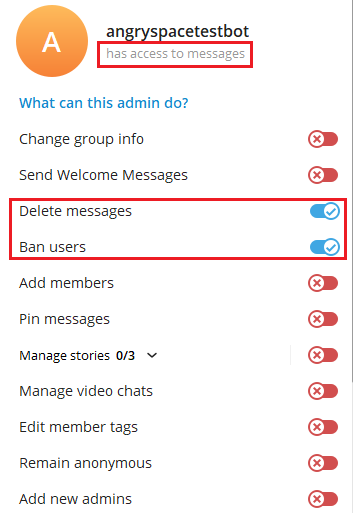
If everything is done correctly, the service will begin collecting messages posted by users in the group chats to which you added the bot.
Depending on the settings you have set in the service, you will be able to see them in the"Comments"or"Messages"section.
Important! How to avoid collecting spam from third-party groups/channels?
Please note that your bot may be added to a third-party chat or channel without your knowledge, and spam will begin to be collected in the service, which will be counted in the statistics and, accordingly, in the final cost of the service.
After adding the Telegram bot, perform the actions specified inTHIS ARTICLE.
This will help avoid spam comments getting into the service.