LinkedIn page connection
The service currently supports processing of:
- Comments under your posts
- Public @mentions
Direct messages cannot be collected.
Only company or brand pages can be connected to the service.
Regular groups cannot be connected.
For proper connection and further operation, the user account through which the page is connected to the service must have permanent Super Admin rights.
Regular groups cannot be connected.
For proper connection and further operation, the user account through which the page is connected to the service must have permanent Super Admin rights.
To add a LinkedIn page to the service:
Go toSettings - Social profilesand click on the "Add Social profile" button with the required company
In the window that opens, click the "Add" button next to LinkedIn
In the window that opens, click the "Authorize" button and sign in to your LinkedIn profile
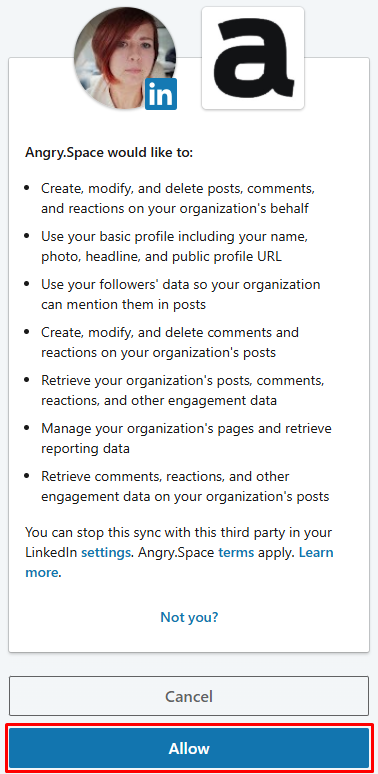
Grant our application all requested permissions
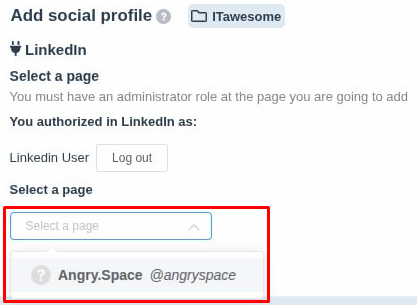
- Select the desired page from the dropdown list
- Click the "Add social profile" button
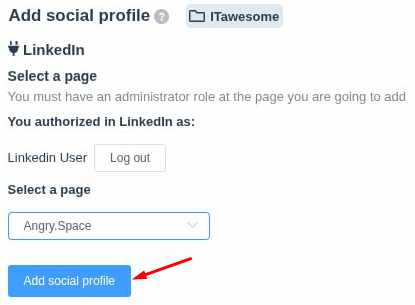
If everything is done correctly, the service will start collecting comments and @mentions, which can be viewed and managed in theComments section.